

Content Management Systems (CMSs) have 1 purpose and 1 purpose only, they manage our content allowing us to create, edit and delete content as we like.
Our new CMS is at the point where it is a fully functioning system, allowing users to manage other users, roles, the API, and much more, but it is simply a system that allows a user to use the system, nothing more. Without the Content Management it has no purpose. Now we have the system, and it is a great system, we are at the point where we can add the ability to Manage Content. This article will look at how we are putting this together.
Content data store
A CMS could simply save content into the data store for every peice of content. We create a title, a body and save it into the data store. Nice and simple. However, this is not flexible, it does not allow different content types or the addition of fields as needed. We decided to be more flexible rather than rigid, let's have a look at what we decided.
If data isn't your thing, you might want to skip this section and scroll to the Content Fields.
The most simple way is to have a look how the data connects, so let's have a look at the schema (if the schema isn't for you I've explained below) for the data:
content: {
        primaryKey: { name: 'id', type: 'string', default: 'cuid' },
        title: { type: 'string', required: true, isTitle: true, constraints: { max: 500 } },
        slug: { type: 'string', isNullable: true, isUnique: true, index: true, format: 'slug',  constraints: { max: 500 } },
        published: { type: 'boolean', default: false, index: true },
        status: { type: 'string', isNullable: true, index: true, constraints: { max: 50 } },
        deleted_at: { type: 'date', isNullable: true, index: true },
        created_at: { type: 'date', default: 'now()', index: true, isClientSetForbidden: true },
        updated_at: { type: 'date', default: 'now()', isClientSetForbidden: true },
        content_type_id: { type: 'string', required: true, index: true },
        content_type: { relation: { type: 'content_type', name: 'content_type_content', foreign_key: 'content_type_id', onDelete: 'restrict' } },
        content_revisions: { relation: { type: 'content_revision', isList: true, name: 'content_content_revisions' } },
        active_revision_id: { type: 'string', isNullable: true, index: true, isUnique: true },
        active_revision: { relation: { type: 'content_revision', name: 'active_content_revision', foreign_key: 'active_revision_id', onDelete: 'set_null' } },
    },
    content_revision: {
        primaryKey: { name: 'id', type: 'string', default: 'cuid' },
        revision_number: { type: 'int', default: 0 },
        description: { type: 'string', isNullable: true, isTitle: true, constraints: { max: 300 } },
        data_json: { type: 'string', required: true, format: 'json', constraints: { max: 4000000 } },
        created_at: { type: 'date', default: 'now()', index: true, isClientSetForbidden: true },
        user_id: { type: 'string', isNullable: true, index: true },
        user: { relation: { type: 'user', name: 'user_content_revisions', foreign_key: 'user_id', onDelete: 'set_null' } },
        content_id: { type: 'string', required: true, index: true },
        content: { relation: { type: 'content', name: 'content_content_revisions', foreign_key: 'content_id', onDelete: 'cascade' } },
        active_for_content: { relation: { type: 'content', isList: false, name: 'active_content_revision' } },
        unique: { fields: ['content_id', 'revision_number'] }
    },
    content_type: {
        primaryKey: { name: 'id', type: 'string', default: 'cuid' },
        title: { type: 'string', required: true, isTitle: true, constraints: { max: 255 } },
        description: { type: 'string', isNullable: true, constraints: { max: 300 } },
        key: { type: 'string', isUnique: true, required: true, format: 'slug', constraints: { max: 64 } },
        is_default: { type: 'boolean', default: false, index: true },
        deleted_at: { type: 'date', isNullable: true },
        created_at: { type: 'date', default: 'now()', isClientSetForbidden: true },
        updated_at: { type: 'date', default: 'now()', isClientSetForbidden: true },
        contents: { relation: { type: 'content', isList: true, name: 'content_type_content' } },
        content_type_fields: { relation: { type: 'content_type_field', isList: true, name: 'content_type_content_type_field' } },
    },
    content_type_field: {
        primaryKey: { name: 'id', type: 'string', default: 'cuid' },
        content_type_id: { type: 'string', required: true, index: true },
        content_type: { relation: { type: 'content_type', name: 'content_type_content_type_field', foreign_key: 'content_type_id', onDelete: 'cascade' } },
        field_id: { type: 'string', required: true, index: true },
        field: { relation: { type: 'field', name: 'field_content_type_field', foreign_key: 'field_id', onDelete: 'cascade' } },
        admin_order: { type: 'int', isNullable: true },
        presentation_order: { type: 'int', isNullable: true },
        overrides: { type: 'string', format: 'json', isNullable: true },
        unique: { fields: ['content_type_id', 'field_id'] }
    },
    field: {
        primaryKey: { name: 'id', type: 'string', default: 'cuid' },
        title: { type: 'string', required: true, isTitle: true, constraints: { max: 255 } },
        description: { type: 'string', isNullable: true, constraints: { max: 500 } },
        is_default: { type: 'boolean', default: false },
        config_values: { type: 'string', isNullable: true, format: 'json', constraints: { max: 10000 } },
        deleted_at: { type: 'date', isNullable: true },
        created_at: { type: 'date', default: 'now()', isClientSetForbidden: true },
        updated_at: { type: 'date', default: 'now()', isClientSetForbidden: true },
        content_type_fields: { relation: { type: 'content_type_field', isList: true, name: 'field_content_type_field' } },
        field_type_key: { type: 'string', required: true, index: true },
        field_type: { relation: { type: 'field_type', name: 'field_field_type', foreign_key: 'field_type_key', onDelete: 'restrict' } },
    },
    field_type: {
        primaryKey: { name: 'key', type: 'string', isUnique: true, isClientSetForbidden: false, constraints: { max: 64 } },
        title: { type: 'string', required: true, isTitle: true, constraints: { max: 255 } },
        description: { type: 'string', isNullable: true, constraints: { max: 300 } },
        is_default: { type: 'boolean', default: false },
        data_type: { type: 'string', required: true, constraints: { max: 50 } },
        admin_format_key: { type: 'string', required: true, index: true },
        admin_format: { relation: { type: 'field_format', name: 'admin_format', foreign_key: 'admin_format_key', onDelete: 'restrict' } },
        presentation_format_key: { type: 'string', required: true, index: true },
        presentation_format: { relation: { type: 'field_format', name: 'presentation_format', foreign_key: 'presentation_format_key', onDelete: 'restrict' } },
        deleted_at: { type: 'date', isNullable: true },
        created_at: { type: 'date', default: 'now()', isClientSetForbidden: true },
        updated_at: { type: 'date', default: 'now()', isClientSetForbidden: true },
        fields: { relation: { type: 'field', isList: true, name: 'field_field_type' } },
    },
    field_format: {
        primaryKey: { name: 'key', type: 'string', isUnique: true, isClientSetForbidden: false, constraints: { max: 64 } },
        title: { type: 'string', required: true, isTitle: true, constraints: { max: 255 } },
        description: { type: 'string', isNullable: true, constraints: { max: 300 } },
        component: { type: 'string', required: true, constraints: { max: 255 } },
        config_schema: { type: 'string', isNullable: true, format: 'json', constraints: { max: 20000 } },
        is_default: { type: 'boolean', default: false },
        created_at: { type: 'date', default: 'now()', isClientSetForbidden: true },
        updated_at: { type: 'date', default: 'now()', isClientSetForbidden: true },
        admin_field_types: { relation: { type: 'field_type', isList: true, name: 'admin_format' } },
        presentation_field_types: { relation: { type: 'field_type', isList: true, name: 'presentation_format' } },
    },
This is an explanation of the above, but it's a little dry. In simple terms:
Content -> Content Type -> Fields -> Field Type -> Field Formats
1. content has an id, title and a few other attributes. This is the main table/collection and when we create the data table for the Content Management, this is the data we get. This joins to content_revision which keeps all the data for the revision (for rollbacks and versioning), so if we want the latest version of the content we simply get the content and the content_revision with the content_revision.id that matches the content.active_revision_id.
2. content_type is the type of content we created e.g. Article, Course, Webpage, etc, etc. and links back to the content with the content_type.id and the content.content_type_id.
3. fields are the building blocks of the content. We could create a field called 'Main Content' or 'Body Content' and add it to the Content Type.
Without fields, the content would not have a anything but a Title.
The field links to the content_type via content_type_fields which is a list using the table content_type_field that holds the order of the fields and and overrides per content type.
4. field_type makes up the Fields, for example we might have a field_type called 'Text Input' and we can make fields like Subtitle, Description, Body Text, etc all from this field_type. A Field Type is a glue for Field Formats, one Field Format for the presentation layer and one for the admin.
5. field_formats are the engine behind the whole thing. This is the code that runs and the configuration that is used to create the Content Management form. For every field_format we have a folder containing the index.jsx and the config.json. The field format can contain other files like CSS or more JavaScript, but they must contain the main JavaScript file and the config.
The field_format in the data store is simply a copy of the config and a pointer to the JavaScript file to run. The field_format connects back to the field_type using field_format.admin_field_types and field_format.presentation_field_types. On setup the system will collect all the Field Formats and seed them into the database.
That's everything for the data side of the content, let's have a look at the user side.
Content & Fields
Content is complex when making a flexible CMS (see the data above) and it's get's even more complex when adding the pages to allow a user to create everything they might need. Let's go through it backwards, as it makes sense to go from the Field Format through to the content.
Field Formats
We create a Field Format that has config and a JavaScript file. The config is pulled into the data store and kept in field_format.config_schema and looks something like:
{
  "title": "Raw Value Settings",
  "description": "Configuration for displaying the raw database value.",
  "properties": {
    "prefix": {
      "title": "Prefix",
      "description": "Text to display before the value (e.g., '$').",
      "type": "string",
      "control": "text_input",
      "default": ""
    },
    "suffix": {
      "title": "Suffix",
      "description": "Text to display after the value (e.g., ' kg').",
      "type": "string",
      "control": "text_input",
      "default": ""
    }
  }
}
We will also have a file that is ran when needed for either presentation or the admin form and looks something like:
// components/fieldFormat/ValueReturned/index.jsx

import React from 'react';

/**
 * ValueReturned - Conforms to Field Format Component Contract.
 * Returns the raw value. Useful for simple text display or
 * when the parent handles the styling/wrapping.
 */
const ValueReturned = ({
   value,
}) => {
    const displayValue = (typeof value === 'object' && value !== null)
        ? JSON.stringify(value)
        : value;

    return displayValue ?? '';
};

export default ValueReturned;
Finally, we have the data to go with this, making up the field format. Currently, there is no way to create more field formats at run time, but we are adding import so the user can upload new field formats and maybe a repository to go with it. There will be multiple field formats with the system at setup that will allow creation of all the main content types, so most of the time import will not be used.
In the data store we have something like:
| key | title | description | component | config_schema | is_default | created_at | updated_at |
| value_returned | Raw Value Settings | Configuration for displaying the raw database value. | ValueReturned | "{\r\n \"title\": \"Text Input Settings... | 1 | 1772532098103 | 1772532098103 |
The only column worth mentioning here is the is_default. This is to tell the system this is a default Field Format and not a user created one. We use is_default in a few places so the user cannot simply delete or edit parts of the system that are seeded and relied on. Using the API or the database these can still be deleted, but general usage cannot break the system.
Field Types
Next up we have the Field Types, these are the glue to holds the field formats together.
We set a Title, for example Workflow.
We then set a data type (we may remove this as it might not have a purpose), for example 'JSON/Map' for an array or list which is the type of data we will save into the data store.
Next we select the two Field Formats, the first is the Admin format, so we might select 'Workflow Admin Settings'. We then choose our "Raw Value Settings" for the presentation side.
Now, the workflow is how content gets from a draft copy to published and is nothing to do with the presentation, so why do we even have a presentation side?
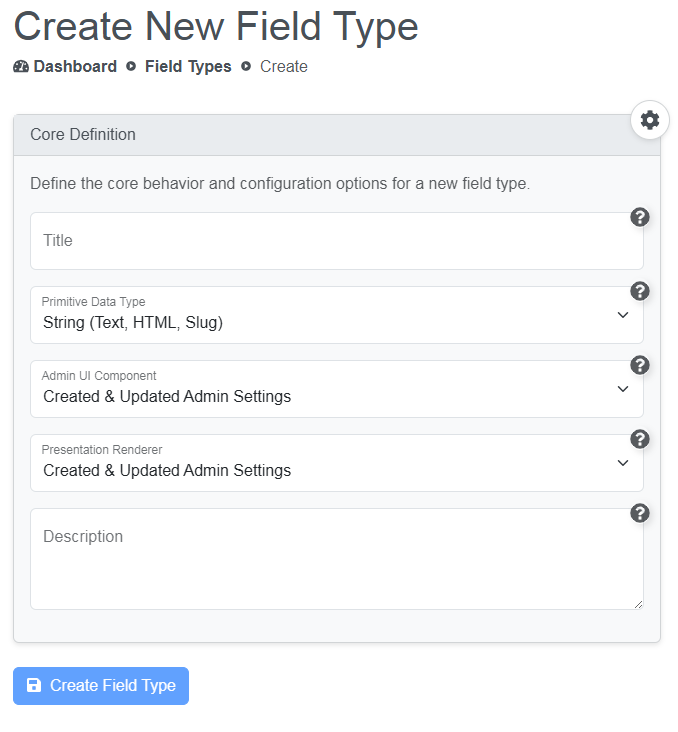
This is a first draft of the Field Types form and will be updated to change text and possibly remove unneeded options on the next pass.
We finish off with a description and the Field type is complete.
Fields
From our Field Type we can build any number of Fields, which are the building blocks to create Content Types.
Sticking with our Workflow example, we could create 2 workflows, the first a basic Un/Publish called 'Publish' that allows a user to create content and publish when the content is complete. The second, a more team orientated workflow with stages for Draft, Media, Translation, Published and SEO, so the content could be passed to different teams. We can call this field 'Workflow'.
Both of these allow users to create content over multiple sessions and publish it only when ready.
We then have filters, sorting and searching so that teams or user can see only what they are interested in e.g. Filter Translation only for the translation team.
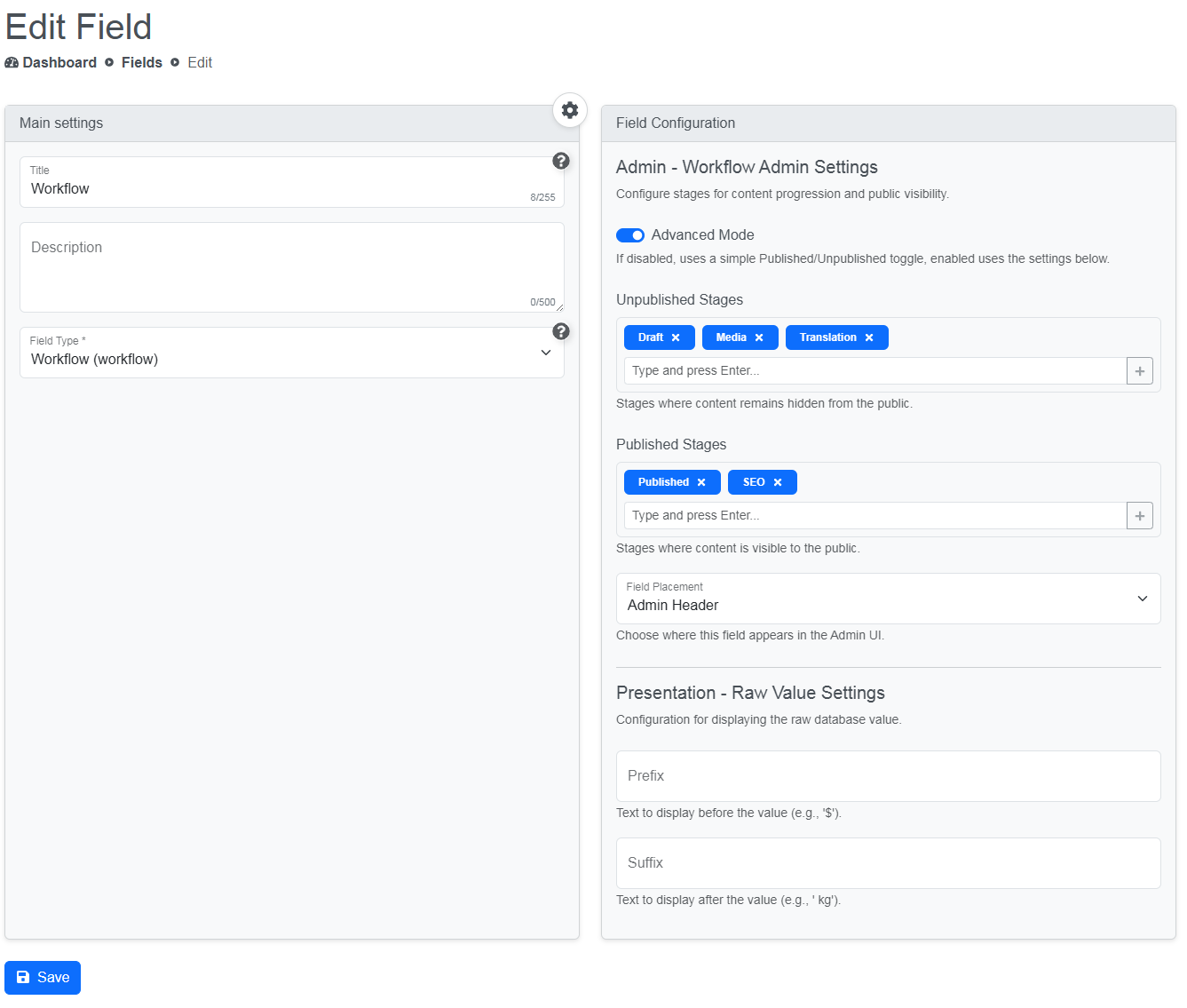
Again, this form is work in progress and will change as we develop, for example, the Presentation config will not be shown if the user does not need a presentation side.
We can create any number of Fields from a Field Type, and the config on the right will change depending on the Field Type chosen. In the case above we have chosen our Workflow Field Type, so we see the config from the Field Format for Workflow Admin Settings and Raw Value Settings.
At system is setup, there are a bunch of Fields created so the user can simply start using them or editing them to their own preferences.
Content Types
We now have a bunch of fields, so we create our Content Types e.g. Article, Webpage, Course, etc.
If we create the most basic Webpage, we will have a Title, which is added to all content automatically, then we can attach the 'Main Content' Field, which we ticked the WYSIWYG rich text editor and gave 4000 chars (we can add any number here) and gave it 14 rows of height so it's nice and chunky.
Next we attach the 'Title Slug', which we have setup to use the Title, so as soon as we start typing the title, the slug will start to be filled automatically. On the Presentation side, The slug will be used to find the content and create the link in the menus (we'll use the id if a slug doesn't exist).
Lastly, we attach the 'Published' field, which allows the user to show/hide the content publicly (if no Workflow Field is added, all content is simply published).
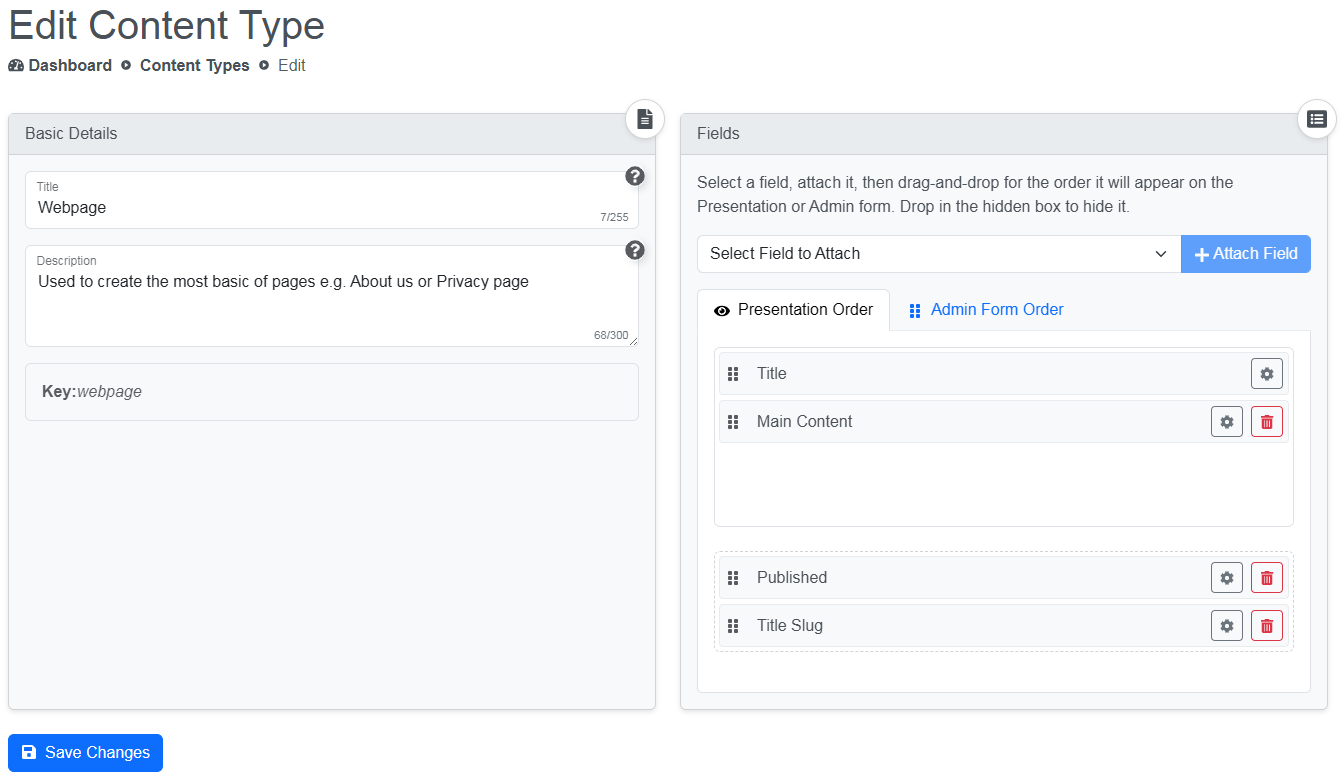
You'll notice on the Presentation Order tab, Published and Title Slug have been dragged into the Hidden box so they will not show on the Presentation side.
The little cog on each Field lets us override some of the config like label name, but only for this Content Type.
As with other forms, this is a work in progress, so Title Slug and Published my not even have a Presentation side and my not even show here in later iterations.
Content
Lastly is the Content Management, this is the place we actually build the content.
When we hit Create Content, the system will show the choice of content types or, if there is only 1 type of content, go to the creation form for that content.
Once we are on the content creation page, the form is created using the Fields for that type. We then fill in the fields for the content.
Below is the image for the the Webpage we've been looking at.
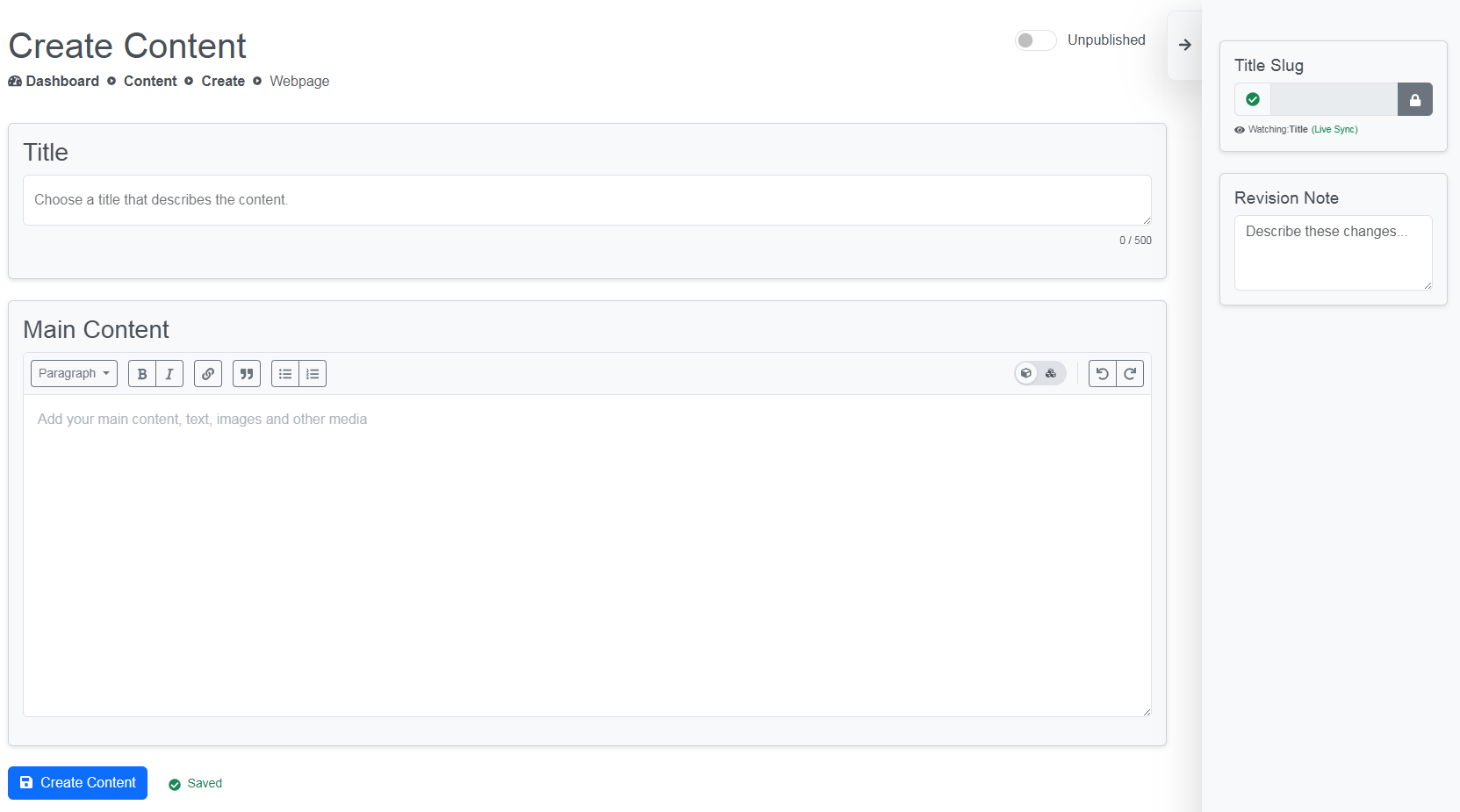
We can see there is nothing in the title or the main content yet. The Admin Drawer on the right is open, so we can see the Title Slug is empty and there is no Revision Note for this version.
The Title Slug is in the Admin Drawer because we chose that on it's layout options, but we could have had it appear above the title or below the content. When we close the Admin Drawer, Slug and Revision History will not be shown because we don't need to worry about them for normal usage.
If you look at the top right you can also see this content is unpublished, so if we fill out the Title and save, the content will not be public.
Summary
There is much, much more we can do with this system of Fields and Content as it is extremely flexible, for example there is no Description for SEO or image card for sharing on this Webpage type, but we could easily add them using what we have here.
We have no translation options or publishing schedule on these content types either, but we will add these using this system.
We have not added Author or Updated date to the Webpage as they are not needed, but these are integral to the Article for blogs and are in the system right now, so creating the Article type is a matter of duplication the Webpage type, adding the extra fields and changing the title and description.
There are many more fields we can add to the system and we will add all the fields we need to support the content types we'll add for version 1 of the CMS, but we'll need import and a repository so we can add more. All the forms I've shown in this article are Work In Progress (WIP) and as the system has no name or brand we will be tweaking them for a while as we work on the UX, Layout, UI and design.
We are probably about half way though this project, so this might be a good time to go over the history of the CMS in the next article. If you would like any more information about any of this, please let me know. If you have any ideas or anything you wish to add or you'd just like some we work doing, comment or contact us.